Subscribe to our newsletter
Thanks you for subscription!
Oops! Something went wrong while submitting the form.


OpenClaw is always doing things you don't notice. While you sleep, it's triaging emails, running research jobs, summarising documents, preparing context for your morning. None of this needs an answer in under a second.
But if your agent is running on a real-time inference API - OpenAI, Anthropic, or any standard endpoint - you're paying real-time prices for work with no real-time requirement. That's a bad trade.
The smarter architecture: keep interactive chat on a fast, low-latency model, and route your background, scheduled, and batch tasks to Doubleword - a high-throughput inference cloud that's significantly cheaper for exactly the workloads OpenClaw runs in the background.
Think of your OpenClaw agent as having two inference tiers:
User message → [Fast real-time model] → Immediate response
Cron / heartbeat → [Doubleword] → Background work, done in minutes
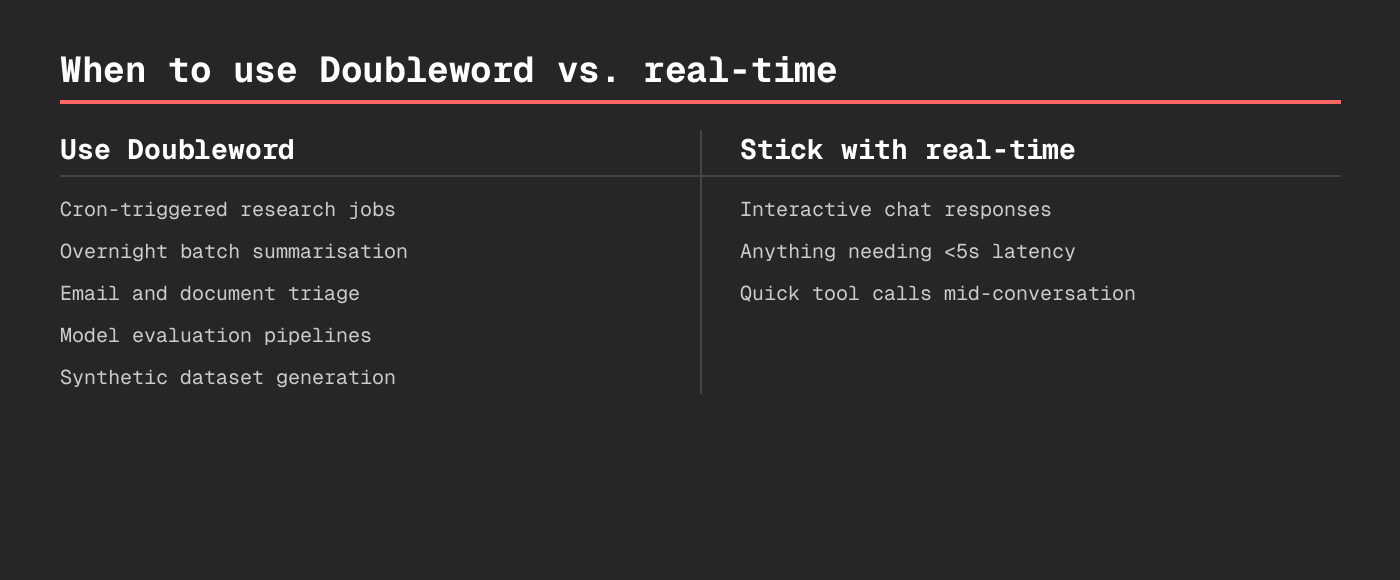
Tier 1 (real-time): Your main session. Chat, quick lookups, live questions. Use whatever's fastest for you.
Tier 2 (Doubleword): Overnight research, batch email triage, document summarisation, synthetic data, model evals - the heavy lifting that doesn't need to be instant.
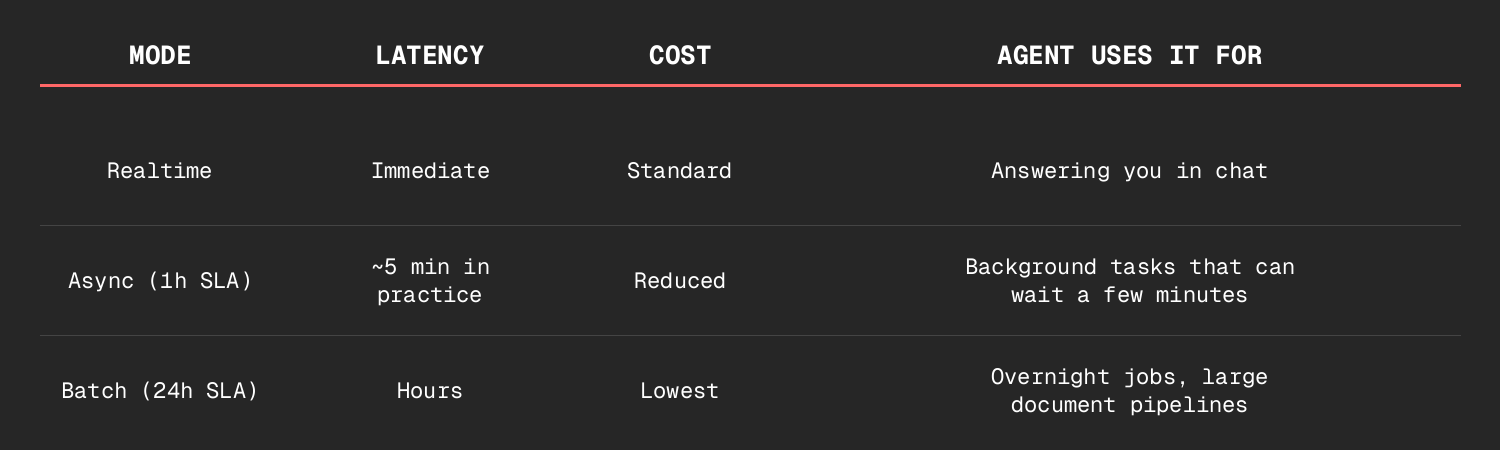
Doubleword is fully OpenAI-compatible - same API format, same SDK. Migrating is a config change, not a rewrite.
The fastest way to get your OpenClaw agent using Doubleword is via the Doubleword skill - a reusable capability that teaches your agent the entire batch API: how to submit jobs, check status, download results, and choose the right model.
npx skills add https://github.com/doublewordai/batch-skill
Once installed, your agent knows everything it needs to use Doubleword - without you having to explain anything. It can answer "what models are available?", "how do I submit a batch job?", and actually do those things on your behalf.
Sign up at app.doubleword.ai and store your key:
cat >> ~/.openclaw/.doubleword_creds << 'EOF'
DOUBLEWORD_API_KEY=sk-your-key-here
DOUBLEWORD_API_BASE=https://api.doubleword.ai/v1
DOUBLEWORD_MODEL_DEFAULT=Qwen/Qwen3.5-397B-A17B-FP8
EOF
Add a routing note to your workspace TOOLS.md:
## Doubleword (Async/Batch Inference)
- Credentials: ~/.openclaw/.doubleword_creds
- Use for: overnight research, cron jobs, summarisation,
document processing, synthetic data, model evals -
anything where waiting a few minutes is fine
- Not for: real-time chat, mid-conversation tool calls
That's it. Your agent now reaches for Doubleword on background tasks automatically.
→ Full setup guide: docs.doubleword.ai/inference-api/openclaw-setup
Ask your agent: "Research our top 10 competitors and write a brief on each - send it to my inbox in the morning."
Instead of burning real-time API calls, the agent submits a batch job via Doubleword. Ten parallel requests. Processed overnight. Results in your inbox before you're at your desk. At a fraction of what real-time would have cost.
A 7am cron job pulls the last 24 hours of emails, classifies each one (urgent / FYI / can-delete), and drafts one-line summaries for anything that needs attention. With real-time APIs, this is dozens of sequential calls. With Doubleword batch, it's one job, processed in parallel, ready before you wake up.
Running evals against a test set of 500 prompts? That's exactly what Doubleword is built for. Submit once, get results back, compare. No babysitting required.
→ Full OpenClaw setup guide
→ Sign up at app.doubleword.ai
→ batch-skill on GitHub


Teams use Doubleword to run low-cost, large-scale inference pipelines for async jobs.
Free credits available to get started.
